Skip to content Skip to main navigation Skip to footer

Blog

User Behavior Analytics (UBA) Offers Significant Benefits to Management and HR Teams

Cyfin - User Behavior Analytics tools

User Behavior Analytics (UBA) tools, like Cyfin, offer significant benefits to management and HR teams, especially in providing insights into how the workforce is using the internet and IT resources. These benefits extend beyond traditional cybersecurity applications, aiding in understanding and optimizing workforce behaviors and compliance.

For Management:

  1. Productivity Insights: Tools like Cyfin can track how employees use company resources, including internet and software applications. This data reveals trends in productivity, identifying peak productive hours, frequently used tools, or areas where employees might struggle.
  2. Resource Optimization: Understanding which tools and applications are most used, management can make informed decisions about resource allocation, system upgrades, or scaling back underutilized services, guided by data from tools like Cyfin.
  3. Policy Compliance: Cyfin can monitor compliance with company policies regarding internet and resource usage, flagging deviations to ensure adherence to guidelines.
  4. Risk Management: Identifying risky behaviors, such as accessing unsecured websites or improper data transmission, Cyfin helps in mitigating potential risks.
  5. Decision Support: Cyfin provides data-driven insights to support better decision-making regarding workforce management, IT investments, and operational strategies.

For HR:

  1. Employee Behavior Analysis: Cyfin provides HR with insights into employee behavior patterns, including interaction with various company platforms and potential misuse of resources.
  2. Enhanced Onboarding and Training: Insights from Cyfin can help HR tailor onboarding and training programs to be more effective and relevant.
  3. Employee Well-being: Monitoring for signs of burnout or overwork, Cyfin aids HR in addressing employee well-being proactively.
  4. Conflict Resolution and Investigations: In cases of alleged misconduct, Cyfin provides objective data to aid in investigations and conflict resolution.
  5. Talent Management: Analysis from Cyfin can assist HR in talent management, identifying high performers and areas needing additional support.

In summary, UBA tools such as Cyfin offer comprehensive benefits to both management and HR by providing deep insights into employee internet usage and behavior. This understanding aids in better resource management, policy enforcement, and overall organizational efficiency, while also supporting employee well-being and productivity. For non-technical staff, it’s important to present Cyfin and similar UBA tools in a context that emphasizes their practical applications and benefits in a straightforward, relatable manner.

Reporting Issue

Issue

Report returns with zero visits

Resolution

  • Repair and download the latest list
    • Screen Path (‘Categorization – URL list – Repair’ and click the ‘Submit’ button)
  • Delete imported data with issue
    • Screen Path (‘Data Management – Report Database – Delete – Manual’) 
  • Re-import data with issue
    • Screen Path (‘Data Management – Report Database – Import – Manual’)

If this didn’t resolve the issue please call or email support

  • 321-953-5351 ext. 4
  • support@wavecrest.net

V9.6.6 Release Notes for CyBlock Directory Agent

Enhancements

  • User Management
    • Logon Accounts
      • Added 2-factor authentication to logon accounts. When enabled for an account using the edit Logon Account screen, an email code is sent to the corresponding email address each time that user logs on.

Corrections

  • User Management
    • Logon Accounts
      • Corrected issue when editing logon accounts that leads to password being reset.

v9.6.6 Release Notes for CyBlock Software & Virtual Appliance Release Notes

Enhancements

  • Categorization
    • Customize
      • URLs
        • Added ability to customize Application/Sites categorization by either editing existing Application/Sites urls or creating a custom Application/Site.
  • User Management
    • Logon Accounts
      • Added 2-factor authentication to logon accounts. When enabled for an account using the edit Logon Account screen, an email code is sent to the corresponding email address each time that user logs on.
  • Reports
    • Application/Sites Sessions
      • New Web Session reporting. Added web data analyzer to identify user Web Sessions based on a user’s activity to an application. Analyzer is scheduled to run daily to identify sessions for the previous day. Added session fields of Session Start Time, Session Stop time and Session Hits to template reporting and pre-configured Dashboard and panels to Visualizer to display User Session information.
  • Settings
    • Session Analyzer
      • Added new screen to adjust the configurations used by the Session Analyzer. In addition, you can also re-analyze the web data for a given configuration.

Corrections

  • Health
    • Corrected problem with lingering connections to metric server leading to performance degradation.
  • Arrays
    • Fixed product update instructions to propagating to array members.

v9.6.6 Release Notes for Cyfin

Enhancements

  • Categorization
    • Customize
      • URLs
        • Added ability to customize Application/Sites categorization by either editing existing Application/Sites urls or creating a custom Application/Site.
  • User Management
    • Logon Accounts
      • Added 2-factor authentication to logon accounts. When enabled for an account using the edit Logon Account screen, an email code is sent to the corresponding email address each time that user logs on.
  • Reports
    • Application/Sites Sessions
      • New Web Session reporting. Added web data analyzer to identify user Web Sessions based on a user’s activity to an application. Analyzer is scheduled to run daily to identify sessions for the previous day. Added session fields of Session Start Time, Session Stop time and Session Hits to template reporting and pre-configured Dashboard and panels to Visualizer to display User Session information.
  • Settings
    • Session Analyzer
      • Added new screen to adjust the configurations used by the Session Analyzer. In addition, you can also re-analyze the web data for a given configuration.
  • Data Management
    • Log Types
      • Updated CheckPoint parser to be able to parse additional types of records.
      • Updated Zscaler to:
        • parse CSV export and Event format.
        • include additional fields like Super Category.
        • Removed None as valid application.
        • Removed default browser value.
        • Added Tunnel protocol mapping to https
      • Updated Palo Alto parser to include better header record matching. Prevents issues where URL field is misconfigured.
    • Parser
      • Updated parser to properly handle records that have duplicate keys by validating the value.
      • Updated parser to allow protocol mapping to convert field value to http or https protocol.

Corrections

  • Health
    • Corrected problem with lingering connections to metric server leading to performance degradation.
  • Arrays
    • Fixed product update instructions to propagating to array members.

Unlock Comprehensive Web Usage Insights with Advanced Categorization

In the realm of cybersecurity, not all categorization lists carry equal weight. Most firewall and web filtering tools come equipped with these lists, primarily aimed at filtering out websites that pose security threats or legal liabilities, aligning with a company’s usage policy.

However, it’s crucial to be discerning when employing these lists for evaluating employee web usage activity. A common shortfall of conventional lists lies in their narrow focus on security and legal liability, often resulting in a lack of comprehensive categorization. Consequently, they may inadequately represent the full spectrum of employee web activity, frequently leading to mis-categorizations, especially in non-security related categories.

In today’s landscape, website categorization is often perceived as a standardized commodity, with many assuming that all lists render uniform information. This assumption holds if the sole purpose is to filter out malicious content or legal liability sites. However, a multitude of companies necessitate extensive employee web usage reports for intricate purposes such as investigations, managerial oversight, and HR monitoring. These reports are pivotal in identifying areas for augmenting productivity and mitigating prospective legal vulnerabilities.

Overlooking the nuanced differences in categorization lists can inadvertently foster inaccurate reporting, culminating in misguided managerial decisions, compromised investigations, and heightened susceptibility to legal complications.

Since 1996, Wavecrest has been at the forefront, cultivating a categorization system emblematic of comprehensiveness and accuracy. Our unwavering commitment is to furnish a holistic view of web usage. In scenarios necessitating nuanced reporting, it becomes indispensable to consider our meticulously crafted products, Cyfin and CyBlock. These tools are instrumental in facilitating informed decisions, fostering enhanced productivity, and safeguarding against legal pitfalls.

Conclusion: Elevate Your Web Usage Insight with Wavecrest

In a digital ecosystem where precision and comprehensiveness are paramount, settling for a generic categorization list is no longer sufficient. The nuanced demands of modern businesses necessitate a tool that stands resilient against the shortcomings of mis-categorization and incomplete web usage portrayal. Wavecrest’s legacy of innovation and meticulous development has fostered products that transcend the conventional, providing a multi-dimensional view of web activity essential for informed decision-making. With Cyfin and CyBlock, embrace a realm of categorization that is robust, nuanced, and tailored to meet the intricate demands of contemporary web usage monitoring. Opt for Wavecrest, and unlock a wealth of insights that empower your organization to thrive securely and efficiently in the digital landscape.

Unlocking Human Insights from Network Logs: The Role of Specialized Analytical Tools

Abstract

Understanding employee web usage is pivotal for organizations aiming to optimize productivity and ensure policy compliance. Network activity logs, while rich in data, are cluttered with automated and miscellaneous activities that cloud the clarity of human actions. This necessitates the employment of advanced tools capable of fine-tuning the analysis to focus on genuine human interactions. Cyfin stands out in this domain, enabling organizations to derive meaningful, actionable insights from network logs, enhancing decision-making and policy enforcement processes.

Introduction

Navigating through network activity logs to decipher actual employee internet usage presents a complex challenge. The logs are a blend of human-initiated actions and automated processes, making it tough to isolate meaningful user activity. A specialized tool is essential for sifting through this data to reveal the actual patterns of internet usage by employees.

The Need for Enhanced Analytical Tools

Traditional tools often struggle to differentiate between human actions and automated processes in network logs. To accurately interpret employee web usage, a more refined tool is required—one that can sift through the complexities and focus on actual human interactions.

Cyfin: Elevating Analytical Precision

Cyfin emerges as a dedicated solution, uniquely crafted to concentrate on human-oriented activities within network logs. Its design focuses on filtering out the noise, spotlighting genuine user interactions, thus providing a more accurate representation of employee internet usage.

Impact of Cyfin’s Advanced Analysis

Utilizing Cyfin’s nuanced analysis provides numerous benefits to organizations. It minimizes the risk of misinterpreting employee activities, thus avoiding unjust accusations and ensuring that organizational policies are adhered to more effectively.

Conclusion

For a nuanced understanding of employee web usage, a tool like Cyfin, which offers a refined approach to network log analysis, is essential. Cyfin provides the necessary clarity and precision, enabling organizations to make informed decisions based on accurate interpretations of employee internet interactions.

The Importance of SSL Inspection for Monitoring Employee Web Use

The Importance of SSL Inspection for Monitoring Employee Web Use

In the digital era, as businesses rapidly shift towards cloud-based solutions and web applications, maintaining the security and integrity of data has become paramount. One such technique that stands out in ensuring a secure web environment is Secure Socket Layer (SSL) encryption. While SSL helps in securing the data in transit between the client and the server, it poses challenges for organizations when it comes to monitoring and reporting on employee web use. Here’s where SSL inspection comes into play.

Understanding the Blind Spot: HTTPS without SSL Inspection

When an organization does not employ SSL inspection, the encrypted nature of HTTPS connections makes it difficult to have a clear view of the online activities of its employees. In such cases, only the domain name is visible, leaving a blind spot in understanding the exact nature of the content accessed. For example, an employee could access a permitted domain but navigate to inappropriate or risky pages within that domain, all while going unnoticed.

Peering into the Encrypted Tunnel: The Power of SSL Inspection

With SSL inspection enabled, organizations can decrypt and view the content of HTTPS connections. This offers numerous advantages:

  1. Content Type Visibility: By looking at the content type defined in the HTTPS header, organizations can determine the nature of content being transferred, be it images, JavaScript, CSS, or HTML. This helps in identifying if any unauthorized or harmful content types are being accessed.
  2. Identifying the Client with User Agent: The user agent in the HTTPS header provides information about the client making the connection. This includes details like the browser being used, the application, and the operating system. Knowing the user agent can be crucial in scenarios where certain browsers or applications have known vulnerabilities.
  3. Full URL Path Insight: Having visibility into the full URL path, as opposed to just the domain name, provides granular insight into the resources being accessed. This is particularly useful to pinpoint specific pages or resources that might be of concern.

In Conclusion

SSL inspection goes beyond just security; it’s about gaining clear visibility and understanding of employee web activity. This clarity ensures that the reports generated provide a true reflection of online behaviors, making them more accurate and informative. Without SSL inspection, organizations are merely scratching the surface, with a significant chunk of the web activity remaining concealed within the encrypted tunnel. In today’s cybersecurity landscape, where every bit of detail matters, SSL inspection emerges as a critical tool for ensuring both security and compliance.

Sessions

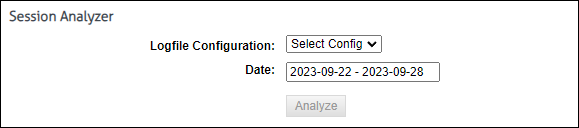
The Session Settings Screen allows you to customize, run, and analyze your session algorithm against specific log file configurations and defined timespans. Built with adaptability in mind, you can modify session algorithm parameters to better align with the unique requirements of any customer environment.

Go to Settings – Reports – Sessions. The Session screen is displayed

Session Analyzer

  1. To manually run the session algorithm go to the Session Analyzer section
  2. Select Log File Configuration: Use the dropdown to select the log files you’d like to include in your analysis.
  3. Define Your Timespan: Using the calendar tool, select your desired start and end dates and times.
  4. Press the button labeled ‘Analyze’ on the screen to initiate the session algorithm.

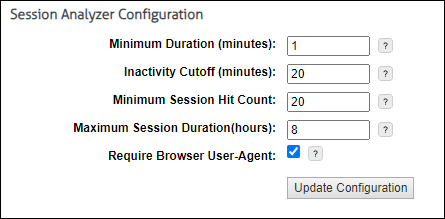
Session Analyzer Configuration

If you’re familiar with the specifics of the session algorithm and wish to fine-tune it, use the input boxes to adjust the default parameters. If unsure, it’s recommended to consult the definition below or contact our support team for assistance.

  1. To override the system defaults use the below input boxes to adjust the default parameters.
  2. Press the button labeled ‘Update Configuration’ to apply Session algorithm parameter changes.

Session Parameter Definitions

  • Minimum Duration (minutes): The least amount of continuous Web activity to a particular Application/Site required to constitute a session.
  • Inactivity Cutoff (minutes): The amount of time since the last activity to an Application/Site for a session to be considered complete. Future activity will start a new Session.
  • Minimum Session Hit Count: The minimum amount of Web activity (log hits) required to each Application/Site for the activity to constitute a Session.
  • Maximum Session Duration(hours): A hard limit in hours for acitvity to single Application/Site.
  • Required Browser User-Agent: When enabled Log records containing known browser types will be analyzed.
    • Notes:
      • Keeping the checkbox enabled allows for a more refined and relevant session analysis by focusing on known browser types.
      • Users who wish to view all log records, regardless of browser type, should disable the checkbox. However, please note that disabling this option will affect the accuracy of the session analysis.
      • Disabling this checkbox might be necessary if SSL inspection is not enabled on your firewall. Without SSL inspection, the session analysis may not only be inaccurate but could also return without any results because the user agent field would be empty.